On a recent project, I needed to figure out how to trigger Agentforce agents from Salesforce automation instead of just the chatbot interface. After some digging, I found you can do this with headless agents.
What Are Headless Agents?
Headless agents are Agentforce running without the chat interface. They get triggered automatically by things like record changes or scheduled processes, which means you can build AI into your normal Salesforce workflows.
What I Built
For this example, I created an agent that automatically generates account summaries when specific checkboxes are checked. Simple use case, but it demonstrates the concept well.
The idea is that when a sales rep gets assigned a new account, they can quickly understand what the company does, how big they are, and how to approach them — all generated automatically by Agentforce.
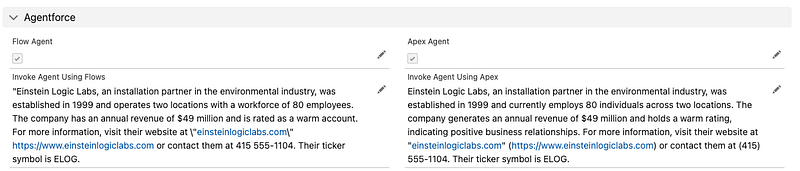
One thing I noticed — the AI responses are always slightly different each time you run them. That's just how AI works. Try asking ChatGPT the same question twice, and you'll see what I mean.
Setting Up the Agent
First, you need an employee agent with at least one topic. I called mine “Account Summary” and kept the setup straightforward.
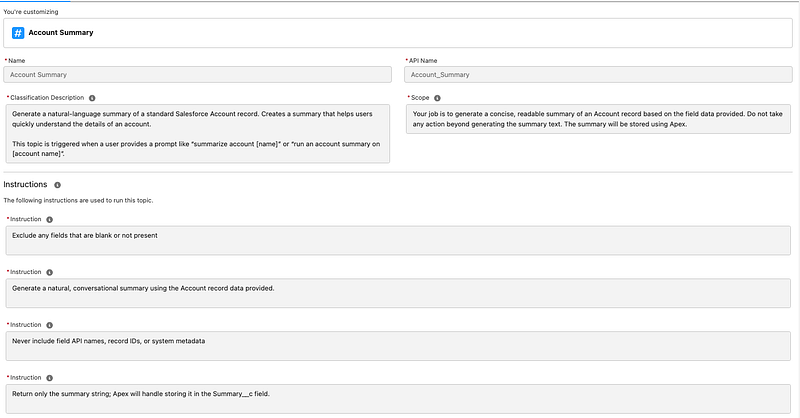
Description: I made sure to include what would trigger this topic — phrases such as “summarize account with the name [Account Name]” or “run an account summary on [Account Name]”. This helps the agent understand when to use this topic.
Instructions: Important lesson I learned. Don't overthink the instructions! Keep them high-level and let Agentforce handle the execution details. The instruction order doesn't matter — everything gets compiled into a JSON object.
I used two actions:
- The standard “Get Record by Name” action
- A custom prompt template I built in Prompt Builder
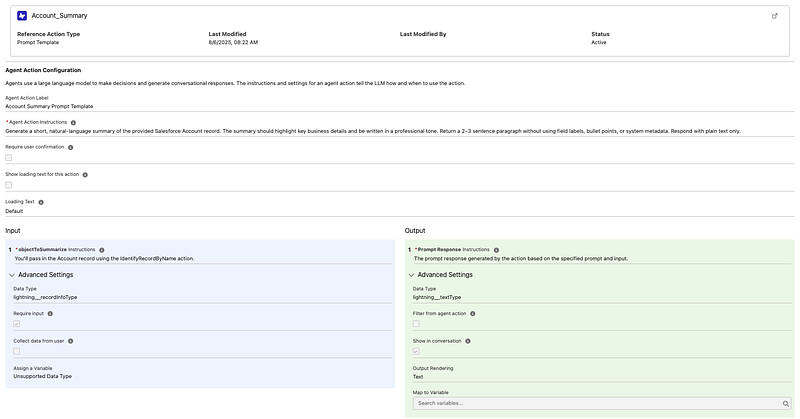
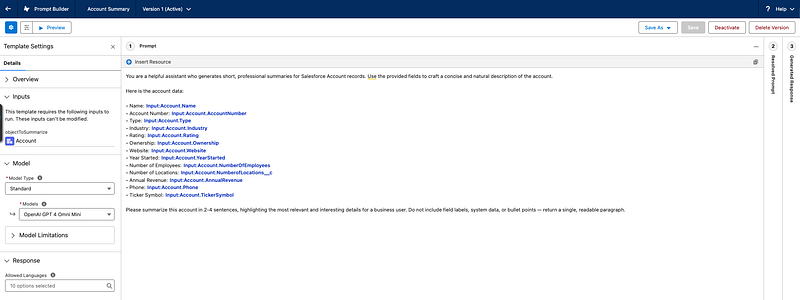
The prompt template is basic — it tells the AI to create a 2–4 sentence summary using key account fields such as industry, revenue, employee count, and other relevant data.
Option 1: The Flow Approach
If you prefer clicks over code, the Flow approach is simple.
Important note: this needs to run asynchronously. Make sure your flow is configured to run after the record is saved.
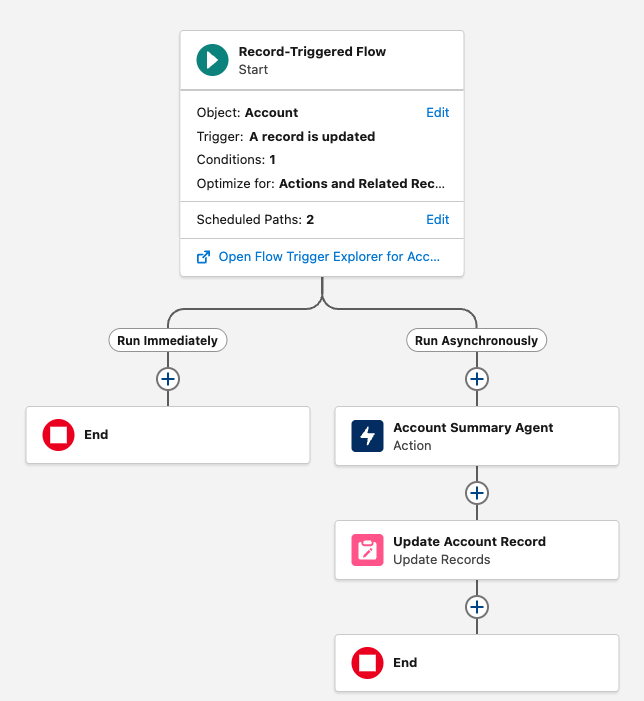
Here's the basic flow:
- Triggered when the account is updated
- Check if the “Flow Agent” checkbox is true
- Call the “Generate AI Agent Response” action
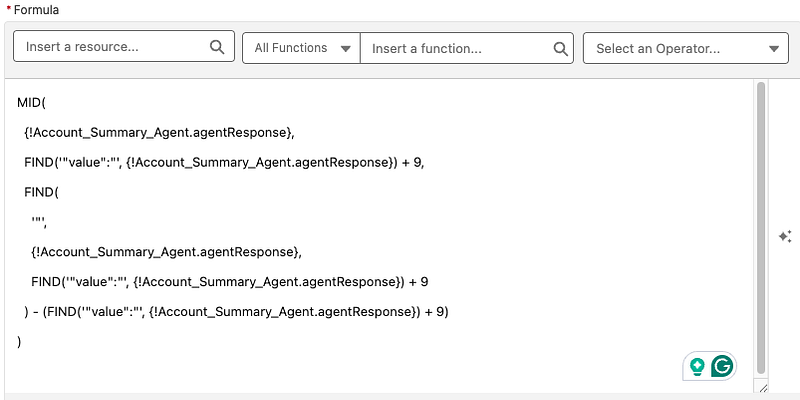
- Parse the JSON response to get just the summary text
- Update the account record
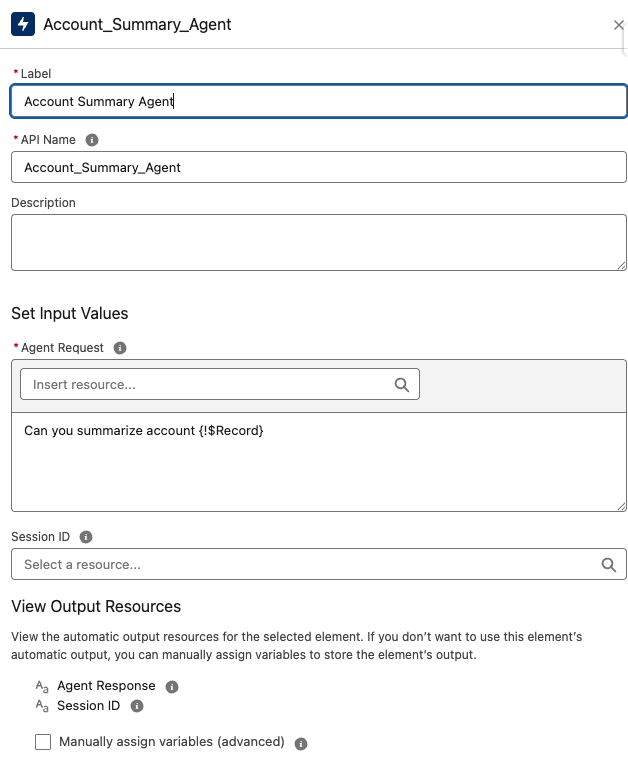
The tricky part is parsing the response. It comes back as JSON with the actual summary buried in a “value” field:
{
  "type": "Text",
  "value": "Einstein Logic Labs, an installation partner..."
}
Option 2: The Apex Approach
I prefer the Apex approach because you get more control, especially when dealing with JSON parsing. Flows can be finicky with complex data structures. With Apex, you can leverage Salesforce's JSON class when you need to handle JSON structures.
Both approaches require asynchronous processing since Agentforce calls take time (they're hitting external AI services). I use a queueable class for this:
public class accountSummaryAgentQueueable implements Queueable {

    private List<Id> accountIds;

    public accountSummaryAgentQueueable(List<Id> accountIds) {
        this.accountIds = accountIds;
    }

    public void execute(QueueableContext context) {
        List<Account> accountsToUpdate = new List<Account>();

        for (Account acc : [SELECT Id, Name FROM Account WHERE Id IN :accountIds]) {
            try {
                String userMessage = 'run an account summary on ' + acc.Name;
                String agentResponse = agentforceHeadlessAgentApi.callAgent('Account_Summary_Agent', userMessage);
                String parsedValue = parseAgentResponse(agentResponse);

                Account accountToUpdate = new Account(
                    Id = acc.Id,
                    Agent_Summary_Apex__c = parsedValue
                );
                accountsToUpdate.add(accountToUpdate);

            } catch (Exception e) {
                System.debug('Error processing account ' + acc.Name + ': ' + e.getMessage());
            }
        }

        try {
            update accountsToUpdate;
        } catch (Exception e) {
            System.debug('Error updating accounts: ' + e.getMessage());
        }
    }

    private String parseAgentResponse(String response) {
        try {
            Map<String, Object> jsonResponse = (Map<String, Object>) JSON.deserializeUntyped(response);
            return (String) jsonResponse.get('value');
        } catch (Exception e) {
            System.debug('Error parsing agent response: ' + e.getMessage());
            return 'Error parsing agent response: ' + response;
        }
    }
}
The core functionality happens in the agentforceHeadlessAgentApi service class, where you call the agent:
public class agentforceHeadlessAgentApi {
    private final static String AGENT_AI_ACTION = 'generateAiAgentResponse';

    public static String callAgent(String agentName, String userMessage) {
        try {
            Invocable.Action action = Invocable.Action.createCustomAction(AGENT_AI_ACTION, agentName);
            action.setInvocationParameter('userMessage', userMessage);

            List<Invocable.Action.Result> results = action.invoke();
            Invocable.Action.Result result = results[0];

            if (result.isSuccess()) {
                return (String) result.getOutputParameters().get('agentResponse');
            } else {
                return 'Error: ' + result.getErrors();
            }

        } catch (Exception e) {
            return 'Error: ' + e.getMessage();
        }
    }
}
The best part is that this all works natively in Salesforce. No external integrations or credential setup — just use the built-in invocable actions.
Flow vs Apex — When to Use What
Use Flow if:
- You want something simple and declarative
- Your team doesn't have developers
- The logic is straightforward
Use Apex if:
- You need complex JSON handling
- You want better error handling
- You're already working in an Apex-heavy org
Both approaches work well. I find Apex more reliable when things get complicated.
Common Issues I Encountered
Performance: These calls aren't instant. Don't try to run them synchronously or you'll hurt your performance. Always use async processing.
AI Variability: As I mentioned, you won't get identical responses every time. That's normal.
Instructions: Don't overcomplicate the agent instructions. I initially tried to be very specific about the order of operations, but learned that doesn't work well. Keep it high-level.
That covers the basics of calling Agentforce agents from your Salesforce automation. Both approaches work well. Flows are great for simpler scenarios and teams that prefer declarative solutions, while Apex gives you more control for complex implementations. Pick whichever fits your team's comfort level and requirements.
Questions?
Connect with me on LinkedIn or subscribe to my YouTube channel for more Salesforce content.
Related Posts
Need Help With Agentforce?
Let's discuss how we can implement Agentforce automation in your Salesforce org.
Schedule a Free Call