
Sometimes the standard Agentforce actions just aren't enough. When you need to bring in external data, apply complex business logic, or make API calls, you'll need to extend your agents with custom Apex code.
In this guide, I'll walk you through building a stock price agent that fetches real-time stock prices using Apex invocable actions. This demonstrates the pattern you can apply to any scenario where you need to go beyond point-and-click configurations.
What We're Building
I built an employee agent that can fetch current stock prices for any ticker symbol. When users ask “What's the price of CRM?” or “Can you tell me the price of NVDA?”, the agent makes a live API call and returns the current stock price.
The agent handles multiple requests seamlessly — you can ask about CRM ($233.63), then immediately ask about another stock, and it fetches fresh data each time.
Video Walkthrough
Why Use Apex Invocable Actions?
Use Apex invocable actions when you need to:
- Make external API calls — Connect to third-party services for real-time data
- Apply complex filter logic — Business rules too complex for standard actions
- Handle advanced business rules — Custom validation or processing logic
- Bring in extra data — Information not available through standard Salesforce actions
Apex gives you the flexibility to handle scenarios that standard configurations can't address.
Agent Configuration: Keep It Simple
The key lesson I've learned: keep your agent topics very high-level. Don't overcomplicate with step-by-step instructions.
Topic Setup
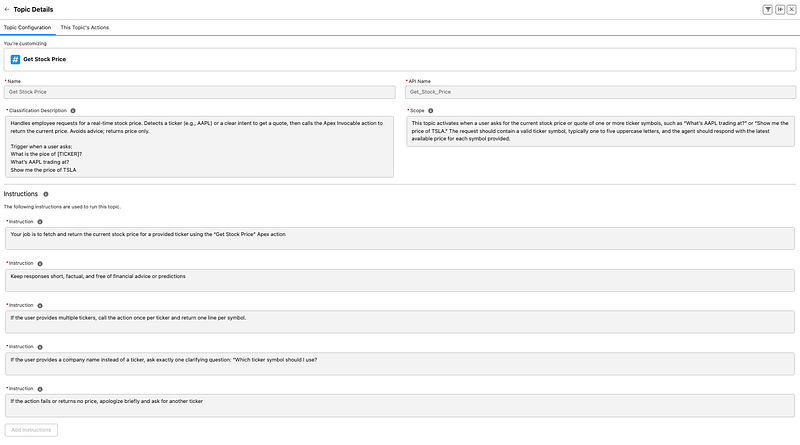
Name: Get Stock Price
Description: User will prompt by passing in a ticker symbol to get current stock price
Instructions:
- Run the Apex class attached to the asset
- If user provides multiple ticker symbols, process them one at a time
- If the action fails, inform the user that the price couldn't be retrieved
Important: Make your topics non-deterministic. Avoid rules like “first do this, second do this, never do X if you don't have Y.” The agent gets confused with overly specific instructions and rarely produces expected results.
Keep it simple: name your topics clearly, provide high-level context, and let the agent handle the execution details.
Asset Configuration
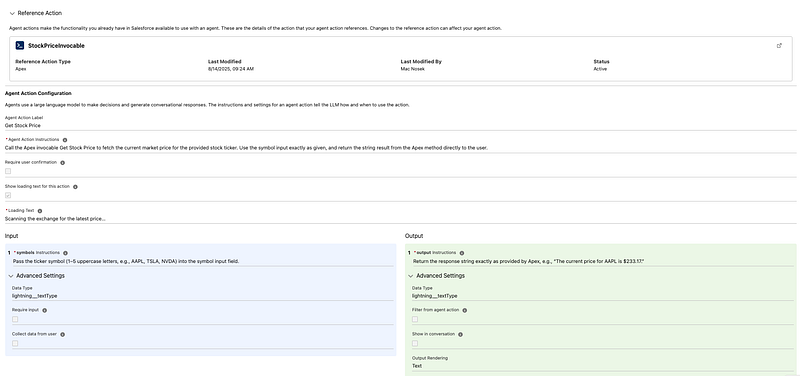
The asset connects your topic to the Apex action:
Instructions: “Retrieve the ticker symbol parameter, run the Apex class, and return the output”
Input Parameters:
- symbol (Text) — Ticker symbol (1–5 uppercase letters)
Output Parameters:
- result (Text) — String response with the stock price
The Apex Implementation
Here's the complete Apex class for fetching stock prices:
public class StockPriceInvocable {

    @InvocableMethod(label='Get Stock Price')
    public static List<String> getStockPrice(List<String> symbols) {
        String symbol = symbols[0];
        String path = '/api/v1/quote?symbol=' + EncodingUtil.urlEncode(symbol, 'UTF-8');

        HttpRequest req = new HttpRequest();
        req.setEndpoint('callout:StockPrice' + path);
        req.setMethod('GET');
        req.setTimeout(10000);

        Http http = new Http();

        try {
            HttpResponse res = http.send(req);

            if (res.getStatusCode() == 200) {
                Map<String, Object> data = (Map<String, Object>) JSON.deserializeUntyped(res.getBody());

                if (data.containsKey('c')) {
                    Decimal price = (Decimal) data.get('c');
                    return new List<String>{'The current price for ' + symbol + ' is ' + String.valueOf(price)};
                }
            }

            return new List<String>{'No price data available for ' + symbol};

        } catch (Exception e) {
            System.debug('Error getting stock price: ' + e.getMessage());
            return new List<String>{'Could not get price for ' + symbol + ' at this time'};
        }
    }
}
Key Implementation Notes
Invocable Methods Always Use Lists
Critical: Invocable methods always expect and return lists, even for single values. You can't pass a single string — it must be List<String>.
// Input parameter
public static List<String> getStockPrice(List<String> symbols) {
    // Always index into the first element for single values
    String symbol = symbols[0];

    // Always return a list
    return new List<String>{response};
}
Authentication with Named Credentials
Use Named Credentials for secure API authentication. In the endpoint URL, reference your named credential:
String endpoint = 'callout:Stock_API/quote/' + symbol;This handles authentication automatically without hardcoding credentials in your code.
Error Handling
Always include proper error handling for external API calls:
try {
    // API call logic
    if (res.getStatusCode() == 200) {
        // Success logic
    } else {
        // Handle API errors
        responses.add('Cannot retrieve price for ticker symbol: ' + symbol);
    }
} catch (Exception e) {
    // Handle system errors
    responses.add('Cannot retrieve price for ticker symbol: ' + symbol);
}
Advanced Patterns
For more complex scenarios, use inner classes to organize multiple inputs and outputs:
public class StockDataInvocable {

    public class StockInput {
        @InvocableVariable(required=true)
        public String symbol;

        @InvocableVariable
        public String exchange;

        @InvocableVariable
        public Boolean includeMetrics;
    }

    public class StockOutput {
        @InvocableVariable
        public String price;

        @InvocableVariable
        public String companyName;

        @InvocableVariable
        public String marketCap;
    }

    @InvocableMethod(label='Get Detailed Stock Data')
    public static List<StockOutput> getDetailedStockData(List<StockInput> inputs) {
        // Implementation
    }
}
This approach keeps your code organized when dealing with multiple parameters instead of managing long parameter lists.
Testing Your Implementation
Test your Apex class independently before connecting it to the agent:
// Test in Anonymous Apex
List<String> testSymbols = new List<String>{'CRM'};
List<String> results = StockPriceInvocable.getStockPrice(testSymbols);
System.debug('Result: ' + results[0]);
Once the Apex works correctly, test the full agent integration with natural language prompts.
Common Pitfalls to Avoid
Over-complicated Instructions: Don't give the agent detailed step-by-step rules. Keep topic instructions high-level and let the agent figure out execution.
Synchronous Processing: External API calls add latency. Design your user experience accordingly.
Single String Parameters: Remember that invocable methods always work with lists, not individual values.
Missing Error Handling: Always account for API failures and provide meaningful error messages to users.
When to Use This Pattern
Use Apex invocable actions when you need to:
- Connect to external APIs for real-time data
- Apply business logic too complex for standard flows
- Process data in ways not supported by standard actions
- Integrate with legacy systems or custom databases
For simpler scenarios like basic record updates or queries, stick with standard Agentforce actions. They're faster to configure and easier to maintain.
Next Steps
This pattern opens up countless possibilities for extending your Agentforce agents. You could build integrations with:
- Financial data providers
- Weather services
- Inventory management systems
- Custom business applications
- Legacy databases
The key is starting simple, like this stock price example, then expanding as your needs grow.
Questions?
Connect with me on LinkedIn or subscribe to my YouTube channel for more Salesforce content.
Related Posts
Need Help With Agentforce?
Let's discuss how we can extend your Agentforce agents with custom Apex integrations.
Schedule a Free Call