
When building intelligent agents in Salesforce Agentforce, understanding the different flow types is crucial for creating efficient, effective automations. In this guide, we'll explore two essential flow types: Auto-Launch Flows and Prompt Template Flows, including their use cases, configuration, and when to use each approach.
The Two Flow Types Explained
Auto-Launch Flows execute direct actions on records — updates, creates, deletes. They're built for speed and simplicity.
Prompt Template Flows gather contextual information from related records to enhance AI responses. They make your agent smarter by providing comprehensive data.
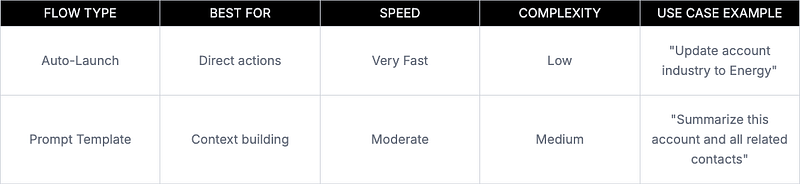
When to Choose Auto-Launch Flows
Choose Auto-Launch when users need immediate record changes:
- Field updates (“Change the industry to Manufacturing”)
- Quick data retrieval (“Show me the account phone number”)
- Simple CRUD operations
- Repetitive actions that need to run fast
When to Choose Prompt Template Flows
Choose Prompt Template when users need intelligent insights:
- Multi-object summaries (“Tell me about this account and its contacts”)
- Context-heavy responses requiring related data
- Analysis that spans multiple records
- Situations where AI needs comprehensive information to respond well
Configuration Guide: Auto-Launch Flow
Use Case: User says, “Update Acme Corp's industry to Energy”
Agent Setup
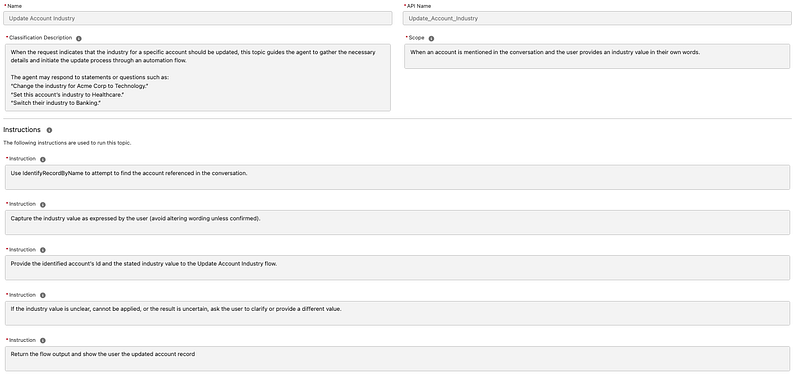
Create a topic specifically for industry updates:
- Name: Update Account Industry
- Description: Updates the industry field for a specified account when the user provides the account name and new industry value
- Instructions: Use the standard record identification to find the account, capture the new industry from the user prompt, then execute the update flow
Agent Asset Configuration
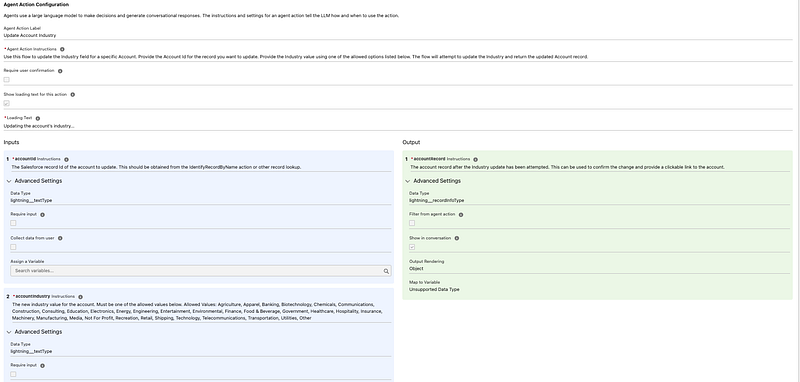
The agent asset bridges the topic to the Auto-Launch Flow:
- Instructions: “Take the account ID and industry parameters, pass them to the flow, and return the updated account record”
- Input Parameters: AccountId and Industry captured from the conversation
- Flow Connection: Calls the Auto-Launch Flow with these parameters
- Output Handling: Returns the updated account record for display
Flow Configuration
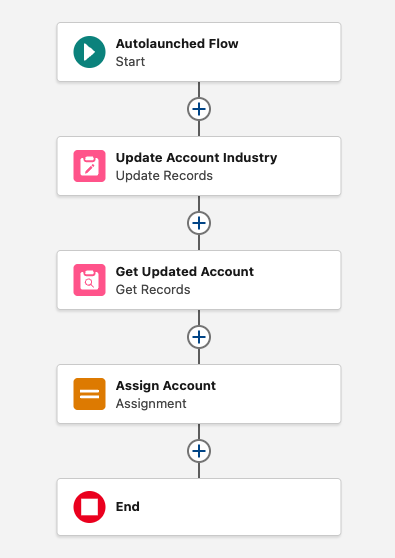
Flow Structure:
- Inputs: AccountId (Text), Industry (Text)
- Process: Update record → Re-query for confirmation
- Output: Updated account record
The flow performs the update, immediately re-queries to get current values, then returns the updated record for the agent to display. This update-then-confirm pattern ensures users see the actual current data.
Configuration Guide: Prompt Template Flow
Use Case: User says, “Can you summarize Acme Corp account?”
Agent Setup
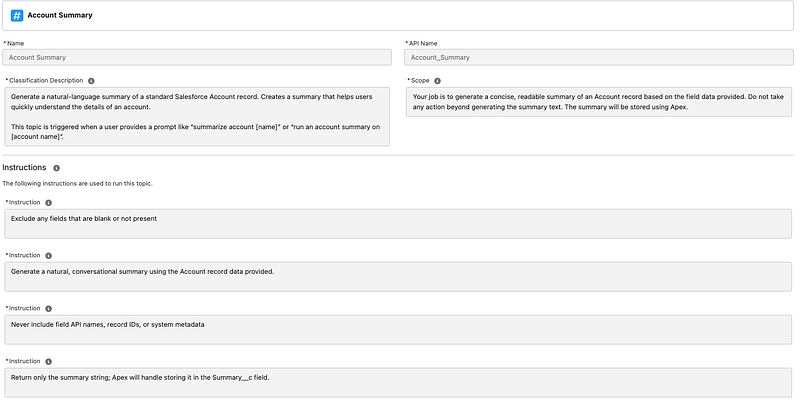
Topic Configuration:
- Name: Account Summary
- Description: Generates a comprehensive account summary, including related contacts
- Instructions: Use standard record identification to find the account, then call the prompt template to compile account details with related contact information
Agent Asset Configuration
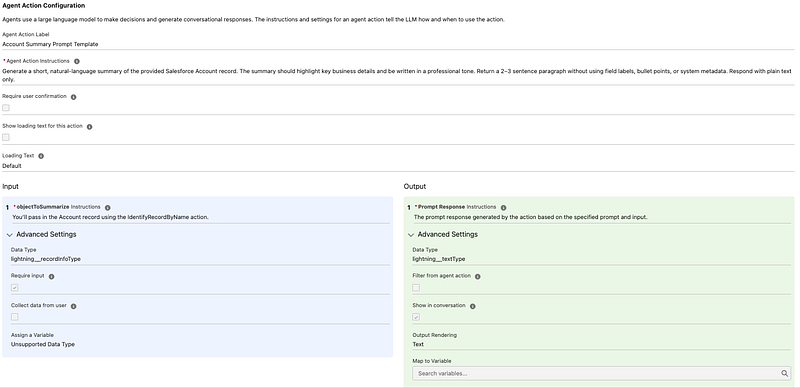
The agent asset connects the topic to the Prompt Template Flow and includes specific instructions:
- Instructions: “Pass the identified account record to the prompt template and compile the summary response”
- Record Input: Account record from the “Identify Record by Name” action
- Prompt Template Call: Passes the account record to trigger the contact summary flow
- Response Formatting: Structures the AI response with both account data and related contacts
Prompt Template Configuration
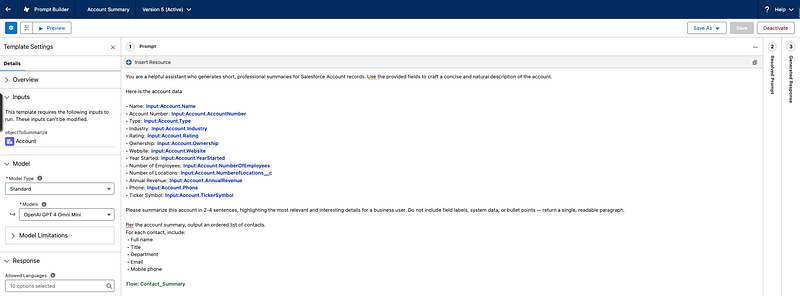
The prompt template combines static account fields with dynamic contact data:
You are a helpful assistant who generates short, professional summaries
for Salesforce Account records. Use the provided fields to craft a
concise and natural description of the account.

Here is the account data:
• Name: {!$Input:Account.Name}
• Account Number: {!$Input:Account.AccountNumber}
• Type: {!$Input:Account.Type}
• Industry: {!$Input:Account.Industry}
• Rating: {!$Input:Account.Rating}
• Ownership: {!$Input:Account.Ownership}
• Website: {!$Input:Account.Website}
• Year Started: {!$Input:Account.YearStarted}
• Number of Employees: {!$Input:Account.NumberOfEmployees}
• Number of Locations: {!$Input:Account.NumberofLocations__c}
• Annual Revenue: {!$Input:Account.AnnualRevenue}
• Phone: {!$Input:Account.Phone}
• Ticker Symbol: {!$Input:Account.TickerSymbol}

Please summarize this account in 2–4 sentences, highlighting the most
relevant and interesting details for a business user.

After the account summary, output an ordered list of contacts.
For each contact, include:
 • Full name
 • Title
 • Department
 • Email
 • Mobile phone

{!$Flow:Contact_Summary.Prompt}
Contact Summary Flow
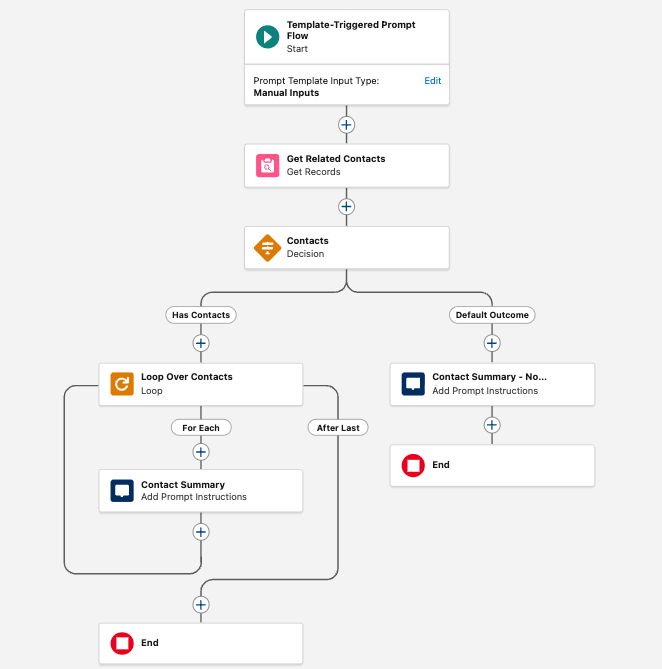
This flow handles the complexity of gathering related contact data:
- Query Related Contacts — Gets all contacts for the account
- Decision Element — Checks if contacts exist to prevent errors
- Loop Through Contacts — Formats each contact's information
- Add to Prompt — Structures data for AI consumption
The decision element prevents errors when accounts have no related contacts, while the loop ensures all contact information is properly formatted and included in the final summary.
Key Implementation Points
Auto-Launch Flows:
- Optimize for quick, repetitive actions
- Keep logic simple with minimal decision points
- Design for specific, predictable user actions
Prompt Template Flows:
- Gather rich context to enable intelligent responses
- Structure data for natural language summaries
- Design for scenarios where context dramatically improves the response quality
Summary
Choose Auto-Launch when users want immediate actions on records. They're fast, simple, and perfect for direct data manipulation.
Choose Prompt Template when users need intelligent responses that require context from multiple related records. They make your AI responses comprehensive and valuable.
Both flow types can coexist in the same agent — use Auto-Launch for quick actions and Prompt Template for smart summaries.
Questions?
Connect with me on LinkedIn or subscribe to my YouTube channel for more Salesforce content.
Related Posts
Need Help With Agentforce?
Let's discuss how we can implement Agentforce automation in your Salesforce org.
Schedule a Free Call